
Source by Qual is
live
(Beta)

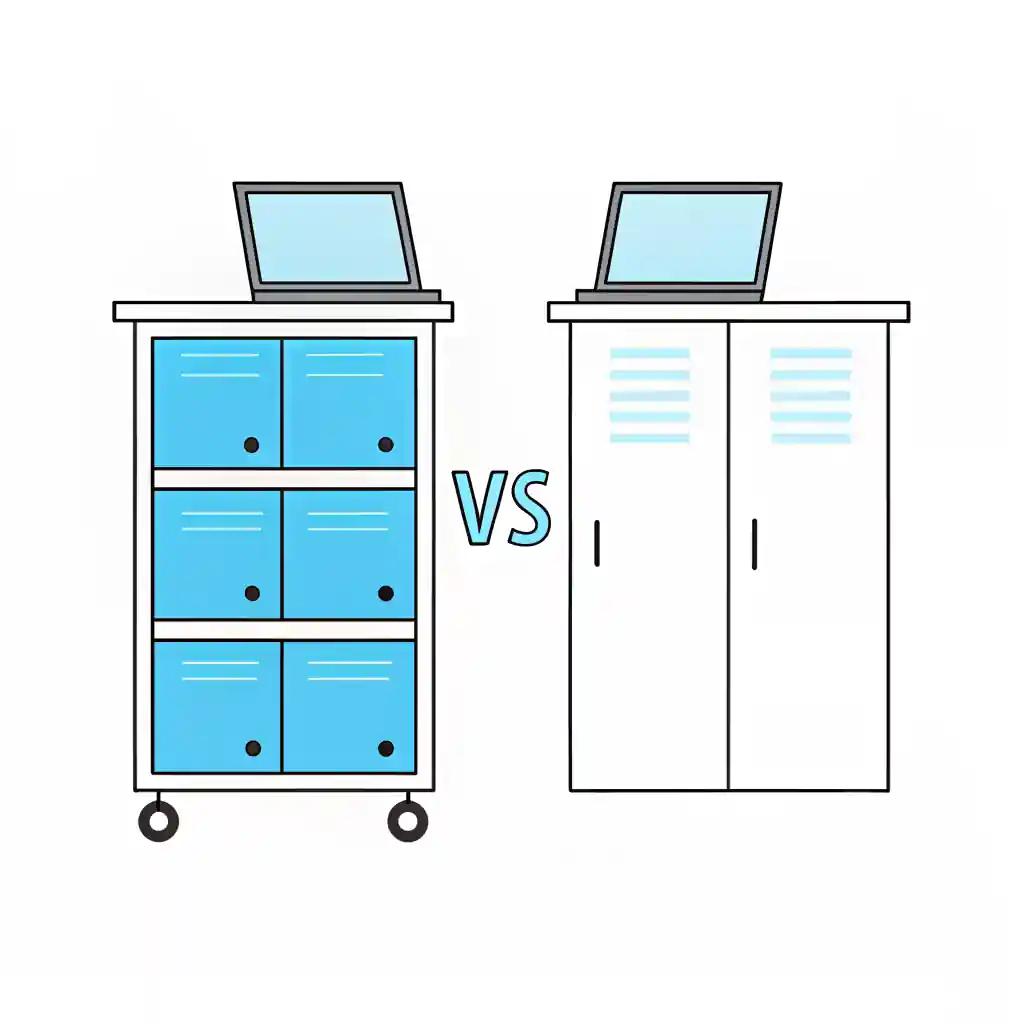
School Device Storage Solutions: Device Carts vs Lockers for Secure Device Storage
Table of Contents
Introduction to Secure Device Storage in Schools
Secure device storage is becoming one of the most critical priorities for schools across the UK. With hundreds of laptops and tablets being used daily by students, teachers, and administrators, protecting these devices while keeping them accessible has never been more important. Schools are under constant pressure to ensure devices are safe, properly charged, and ready for use at any time. This blog explores device carts vs lockers to help you decide which secure device storage solution best suits your school.
What is Secure Device Storage?
Secure device storage refers to solutions designed to protect laptops, tablets, and other IT assets from theft, damage, and misuse. These solutions also ensure devices are charged, organised, and accessible when needed. In the education sector, secure device storage plays a vital role in:
- Preventing costly losses from theft.
- Reducing wear and tear with proper storage.
- Ensuring students and staff can access charged devices quickly.
- Meeting compliance and safeguarding requirements.
Why Secure Device Storage Matters in Education
Education budgets are tight, and every device represents a significant investment. Without secure device storage:
- Devices are more likely to be stolen or misplaced.
- Uncharged or damaged devices cause classroom disruption.
- IT teams spend more time on maintenance rather than strategy.
Device Carts Explained
Device carts are mobile, lockable cabinets designed to store and charge multiple devices at once.
Advantages of device carts:
Advantages of device carts:
- Can move between classrooms easily.
- Store up to 30–40 devices at a time.
- Built-in charging ports keep laptops/tablets powered.
- Cost-effective for schools with limited storage.
- Security depends on locks and staff vigilance.
- Larger units can be bulky.
- Limited to classroom-level management rather than individual devices.
Device Lockers Explained
Device lockers are individual, lockable compartments that store and charge single devices.
Advantages of device lockers:
- High-level security — each student has a personal locker.
- Supports accountability, as students are responsible for their own device.
- Can integrate with access control (e.g., keycards or PINs).
- Keeps devices stored neatly and safely overnight.
- Higher upfront cost compared to carts.
- Requires permanent installation, reducing mobility.
- May take up more physical space.
Network-Enabled Options: Syncing, Charging and Updating Devices
Not all device carts and lockers are created equal. While many provide only charging and secure storage, higher-end models come with network-enabled bays that can make a big difference for IT teams.
🔌 Laptop Trolleys (Charging Carts)
- Standard models: Usually just power outlets or USB-C hubs, no networking.
- Premium / managed carts: Brands like LapCabby, LocknCharge, and Bretford offer versions with internal Ethernet switches and patch panels. This means each bay has a network port, allowing you to:
- Hard-wire laptops for OS updates or imaging.
- Ensure updates happen even if Wi-Fi is weak.
- Sync and charge at the same time.These carts are heavier and more expensive but ideal for larger deployments.
🔒 Laptop Lockers
Basic lockers: Secure metal compartments with charging only.
Network-enabled lockers: Higher-end models (LapSafe, LapCabby UNI, Bretford TechGuard) offer Ethernet ports per bay. Some even support Wi-Fi passthrough while charging, though wired remains more reliable. Perfect for overnight updates or antivirus pushes.
⚖️ Pros & Cons of Network-Enabled Bays
Pros:
- Reliable for imaging and patching.
- Ideal for shared devices in classrooms.
- Allows overnight updates with laptops locked away.
Cons:
- 30–50% higher cost.
- More complex cabling setup.
- Devices may need Wake-on-LAN support for true remote updates.
Device Carts vs Device Lockers: Key Differences for Schools
Lorem ipsum dolor sit amet, consectetur adipiscing elit. Ut elit tellus, luctus nec ullamcorper mattis, pulvinar dapibus leo.
| Pain Point / Consideration | Device Carts | Device Lockers |
|---|---|---|
| Device Charging Capacity | Limited power distribution. Charging many devices at once can overload circuits if not managed correctly. | Designed for simultaneous charging with dedicated power management across multiple bays. |
| Classroom Availability | Carts often move between classrooms, meaning devices may not always be available when needed. | Devices remain stored in a fixed location, making them easier for students to access consistently. |
| Device Organisation | Devices can become mixed or misplaced when returned to carts after lessons. | Each device usually has an assigned locker slot, improving organisation and accountability. |
| Device Security | Carts can be locked, but because they are mobile they may be more vulnerable to theft or tampering. | Fixed lockers offer stronger physical security and are often installed in supervised areas. |
| Scalability for Large Schools | Managing multiple carts across departments can become complicated as device numbers increase. | Lockers scale better for large deployments because they centralise device storage and charging. |
| Ease of Classroom Use | Teachers must move carts between rooms, which can interrupt lesson preparation and scheduling. | Students can retrieve and return devices independently without waiting for equipment delivery. |
| Maintenance & Device Management | Devices may be returned incorrectly or not plugged in properly, causing charging issues. | Individual charging bays reduce the chance of devices not charging properly. |
| Space Requirements | Carts take up classroom space and may block walkways when stored in rooms. | Lockers are typically installed in corridors or common areas, freeing classroom space. |
| Device Accountability | Harder to track which student used which device when many devices share a cart. | Assigned lockers allow easier tracking of device usage and responsibility. |
| Charging Reliability | Devices may not charge if cables are unplugged or poorly organised inside the cart. | Dedicated charging ports ensure devices are consistently powered. |
| Deployment Flexibility | Carts are mobile and useful when devices must move between classrooms. | Lockers are fixed installations and cannot be moved easily. |
| IT Management | IT teams may spend time redistributing carts or checking devices across classrooms. | Centralised lockers make device management easier for IT staff. |
| Device Damage Risk | Devices stacked or moved in carts can be more prone to accidental damage. | Individual locker compartments protect devices from impact and mishandling. |
| Student Access Control | Teachers usually control access to carts during lessons. | Lockers can be configured for individual student access via keys, PINs, or RFID. |
| Initial Deployment Cost | Generally cheaper initial investment. | Higher upfront cost but often lower operational issues long term. |
Both storage methods solve different problems for schools. Device carts offer mobility and flexibility for shared classroom devices, while device lockers provide stronger security, improved organisation, and easier device accountability. The right choice often depends on how frequently devices move between classrooms and how many students rely on shared technology.
Which Device Storage Solution Is Best for Your School?
| Scenario | Device Carts | Device Lockers |
|---|---|---|
| Small schools with limited devices | Ideal. A single cart can serve multiple classrooms. | Usually unnecessary unless devices need secure individual storage. |
| Large schools with hundreds of devices | Can become difficult to manage across departments. | More scalable for large deployments with centralised charging. |
| Shared classroom devices | Works well when teachers distribute devices during lessons. | Less suitable unless lockers are located inside classrooms. |
| 1:1 student device programmes | Less efficient because devices must be redistributed each day. | Ideal solution as each student can store and charge their own device. |
| High security requirements | Moderate security through locking mechanisms. | Strong security due to fixed installation and individual compartments. |
| Limited classroom space | May take up valuable teaching space when stored in rooms. | Lockers installed in corridors free up classroom space. |
| Flexible device movement between classes | Excellent mobility between classrooms. | Limited mobility since lockers are fixed installations. |
| Student accountability | Harder to track which student used which device. | Each locker can be assigned to individual students. |
| Long-term device management | Requires more manual organisation by staff. | Easier device management due to structured storage. |
How Device Carts and Lockers Impact Classroom Workflow
| Teacher Consideration | Device Carts | Device Lockers |
|---|---|---|
| Lesson preparation | Teachers must collect and move carts before class. | Students retrieve devices themselves. |
| Lesson start time | Lesson start time Distribution can take several minutes. | Faster start as students access devices independently. |
| Device returns | Teachers supervise returns to ensure correct charging. | Students return devices to assigned lockers. |
| Classroom clutter | Carts can occupy teaching space. | Lockers remove device storage from classrooms. |
Device Management Considerations for School IT Teams
| IT Management Factor | Device Carts | Device Lockers |
|---|---|---|
| Device charging reliability | Cables may become tangled or unplugged. | Dedicated charging slots improve reliability. |
| Device tracking | Harder to track device usage. | Easier tracking if lockers are assigned. |
| Maintenance | IT staff may need to reorganise carts. | Less manual organisation required. |
| Device damage risk | Devices may move around during transport. | Individual compartments reduce impact damage. |
| Device charging consistency | Some devices may not be plugged in properly. | Each bay ensures consistent charging. |
Cost and Long-Term Value: Device Carts vs Lockers
| Cost Factor | Device Carts | Device Lockers |
|---|---|---|
| Initial purchase cost | Lower upfront investment. | Higher initial cost. |
| Installation requirements | Minimal installation required. | Requires fixed installation and power access. |
| Long-term device management | Higher staff involvement. | Lower operational management once installed. |
| Scalability costs | Multiple carts may be needed as device numbers grow. | Lockers scale better for larger device programmes. |
Factors to Consider When Choosing Secure Device Storage
When deciding between carts and lockers, schools should weigh:
- Number of devices – How many laptops/tablets need storing?
- Usage model – Do students share devices or have assigned ones?
- Mobility needs – Do devices move between classrooms?
- Budget – What’s the available funding?
- Security priorities – Is theft prevention a major concern?
- Space available – Do you have room for lockers or prefer mobile carts?
Best Practices for Secure Device Storage in Schools
Whichever option you choose, here are some tips to maximise your investment:
- Always use secure locks with restricted access.
- Place storage units in monitored or secure areas.
- Label devices and storage slots for easy tracking.
- Integrate with your IT asset management system.
- Regularly audit devices to prevent losses.
FAQs About Secure Device Storage
Which is better for schools — device carts or lockers?
It depends on your needs. Device carts are ideal for mobility and shared use, while lockers provide stronger security and accountability for individually assigned devices..
Can secure device storage also charge laptops and tablets?
Yes. Both carts and lockers are designed with built-in charging solutions, ensuring devices are always ready for use.
Is secure device storage expensive for schools?
Carts are generally more cost-effective upfront, while lockers are a longer-term investment that pays off in enhanced security and accountability.
Can secure device storage prevent theft entirely?
While no solution is 100% theft-proof, secure device storage significantly reduces risks and ensures compliance with safeguarding standards.
Does Qual Limited provide secure device storage solutions?
Yes. We partner with leading vendors to deliver tailored storage systems that fit the unique needs of schools.
Conclusion & Next Steps
The best storage solution depends on how devices are used across your school. Some schools prefer mobile device carts for flexible classroom use, while others choose device lockers to support large-scale 1:1 device programmes with improved security and organisation.
Schools planning large device deployments should also consider factors such as charging infrastructure, device accountability, and long-term management.
Schools planning device deployments often benefit from expert advice when selecting storage and charging solutions.
The team at Qual Limited can help you assess device numbers, charging requirements, and classroom workflows to identify the most suitable solution for your environment.
Continue Reading: IT Risk & Support Strategy
Understanding operational risk, IT resilience, and structured technology management is essential for organisations reviewing their IT strategy. These guides explore the most common risks businesses face when managing infrastructure and selecting the right IT support approach.
Reactive IT Management Risks
Learn how reactive IT environments introduce hidden operational risks that can lead to downtime, security exposure, and unstable systems.
Single Point of Failure in IT: The Hidden Risk That Breaks Businesses
Discover how single points of failure develop inside IT environments and how resilient infrastructure planning removes them.
Immutable Backup: The Last Line of Defence in Your IT Resilience Strategy
Understand why immutable backup is now considered one of the most important defences against ransomware and data loss.
Business Continuity vs Disaster Recovery: RTO, RPO and Real-World IT Planning
Explore how continuity planning and disaster recovery strategies work together to protect organisations from operational disruption.
Evaluating Your IT Support Model
If your organisation is reviewing its IT support structure or considering changing providers, these guides explain what businesses should evaluate before committing to a new support agreement.
Signs Businesses Have Outgrown IT Support
Identify the warning signs that your current IT support model may no longer support the growth or operational requirements of your business.
Managed IT Services vs Break-Fix Support
Compare proactive managed IT services with traditional reactive support models and understand which approach provides greater stability and long-term value.
How to Choose a Risk-Led IT Support Provider in the UK
A practical guide explaining what businesses should evaluate when selecting an IT support partner focused on risk reduction and operational stability.
Assess Your Current IT Risk Exposure
Before committing to new infrastructure or a new IT support provider, you can also:
Complete the IT Governance & Risk Snapshot to identify operational risk gaps.
Use the IT Quote Comparison Tool to validate supplier pricing and review IT proposals.
Work With Qual Limited: Smarter Procurement, Better Results
At Qual Limited, we specialise in streamlining IT procurement and fulfilment for businesses of all sizes. Our approach includes:
- A dedicated Personal Account Manager to handle your IT needs
- End-to-end procurement support, from vendor selection to delivery
- Strategic cost-saving solutions tailored to your budget
- Access to an extensive network of global IT vendors
With 30 years of experience, we understand the challenges of IT procurement and provide customised solutions to eliminate inefficiencies, reduce costs, and improve IT fulfilment speed.
IT procurement doesn’t have to be complex. Qual Limited simplifies the entire process, ensuring you get the right IT solutions at the right price, without the usual frustrations and delays.
Book a consultation today with your dedicated Personal Account Manager and discover how we can streamline IT procurement, enhance efficiency, and drive cost savings.
Book your consultation now and take the stress out of IT procurement with Qual Limited

Tags
Category
Share This Blog
Search for blogs
Popular Searches
AI
Cyber Security
IT Procurement






Featured Blog
x
Biography
Ken, our Senior Sales Consultant, has been with Qual since 2000. Renowned for his excellent customer reputation, Ken specialises in supporting education and providing expert advice on hardware solutions. With decades of experience, he is trusted for his knowledge, reliability, and commitment to finding the right solutions for every customer. Ken’s dedication ensures that clients receive the best service and support every time.


